The System Controls option allows you to define parameters specific for your company along with Default General Ledger Account Numbers and default values. To access the System Controls window, select the menu option entitled System Controls on the General Ledger Main Menu.
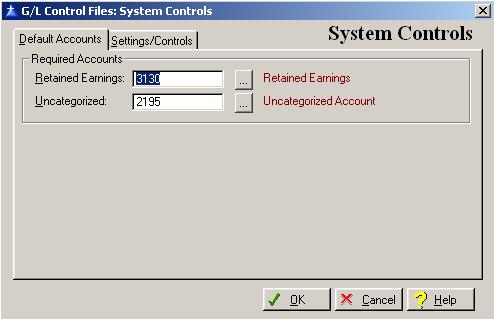
The System Controls window will be displayed as follows:
Default Accounts Tab
Enter or edit the information on the System Control Information - Default Accounts window according to the following specifications:
Retained Earnings
Enter the Retained Earnings general ledger account number. To display a selection list of the valid account numbers, press Enter, or click on the Lookup button. An entry in this field is required.
Uncategorized
Transactions are posted to the Uncategorized account if the system encounters a situation where the general ledger account not was not setup. The system should be trapping for all necessary general ledger account numbers, and it be very unlikely that the uncategorized account number would ever be used. Enter the Uncategorized general ledger account number. To display a selection list of the valid account numbers, press Enter, or click on the Lookup button. An entry in this field is required.
Settings/Controls Tab
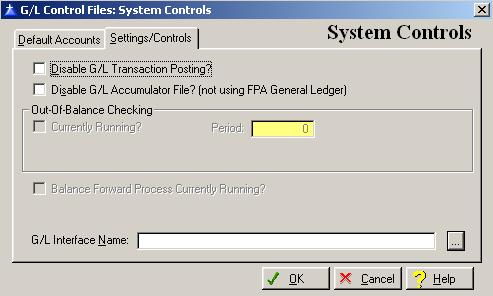
The Settings/Controls tab contains options on whether transactions are posted to the General Ledger file or accumulators.
The System Control-Settings/Controls window will be displayed as follows:
Enter or edit the information on the System Control – Settings/Controls window according to the following specifications:
Disable G/L Transaction Posting?
Check this box ONLY if you do not want Forest Products Accounting transactions to post to the general ledger transaction history file. Very few of our users would ever check this box. DO NOT check this box if you are exporting Forest Products Accounting transactions to a third party General Ledger. To place a check in the box, click on the Disable G/L Transaction Posting box, press “Alt D”, or press the Space Bar when the selection box is positioned over the “Disable G/L Transaction Posting” field.
Disable G/L Total Accumulator File?
Check this box ONLY if you are using a third party’s general ledger. To place a check in the box, click on the Disable G/L Total Accumulation box, press “Alt S”, or press the Space Bar when the selection box is positioned over the “Disable G/L Total Accumulation” field.
Currently Running?
This field will have a check in it if the Out-Of-Balance Report is being run at the current time. This field is controlled by the system.
Period
This is the first period that the Out-Of-Balance Report is being run for at the current time. This field is controlled by the system.
Balance Forward Process Currently Running?
This box will be checked at the end of the month until the first person logs into Forest Products Accounting. This is the field that allows the accounting periods to rollover at the end of the month. This filed is controlled by the system.
G/L Interface Name
The system allows for exporting of data to a third-party General Ledger system. In order to do this please contact Automated Accounting Systems.
To save and exit the System Controls window, press Page Down, click on the OK button, or press “Alt O”. To exit without saving the System Controls, click on the Cancel button, press “Alt C”, press Esc, or click on the “X” in the upper right corner of the screen.
To access online help, click on the Help button, press “Alt H”, or press F1.