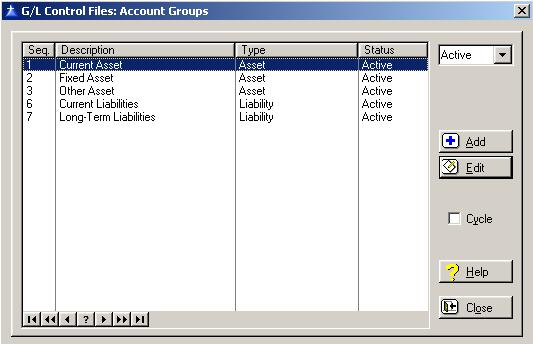
Account Groups are used to group general ledger accounts on the Income Statement and the Balance Sheet.
To access the General Ledger Account Groups List window, select the menu option entitled Account Groups on the General Ledger Control Files Menu.
The Account Groups window will be displayed as follows:
The system defaults to displaying only the active general ledger account groups. To display the inactive, or both the active and inactive general ledger account groups, click on the drop-down box arrow located at the upper right corner of the window.
Cycle Box
To remain in the add mode without returning to the Account Groups list window each time you add a new General Ledger Account Group, check the cycle box. To place a check in the box, click on the Cycle box, press “Alt Y”, or press the Space Bar when the selection box is positioned over the “cycle” field. You would normally check the cycle box if you are entering more than one General Ledger Account Group during the current session.
To access online help, click on the Help button, press “Alt H”, or press F1.
To exit the Account Groups list window, click on Close button, press “Alt O”, or press the Esc key.
Account Group Maintenance
To add a new General Ledger Account Group, click on the Add button, press “Alt A”, or press the Insert key.
To edit an existing General Ledger Account Group, highlight the Account Group and click on the Edit button, press “Alt E”, or press Enter.
When you add a new General Ledger Account Group, the system will display the General Ledger Account Group window as follows:
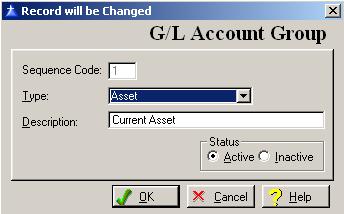
Enter or edit the information on the General Ledger Account Group window according to the following specifications:
Sequence Code
The Sequence Code is a one-character code used to determine what sequence the General Ledger account numbers are displayed on the financial statements.
Type
Select the type by clicking on the drop-down box arrow located on the right side of the box.
Description
Enter up to thirty-characters to describe the General Ledger Account Group.
Status
Select the active box if the general ledger account is active, or select the inactive box if the general ledger account is inactive. The system defaults to displaying only the active Bank Master on the selection list.
To save and exit the Account Groups window, press Page Down, click on the OK button, or press “Alt O”. To exit without saving the Account Groups window, click on the Cancel button, press “Alt C”, press Esc, or click on the “X” in the upper right corner of the screen.
To access online help, click on the Help button, press “Alt H”, or press F1.
Return to Top Accounting Periods