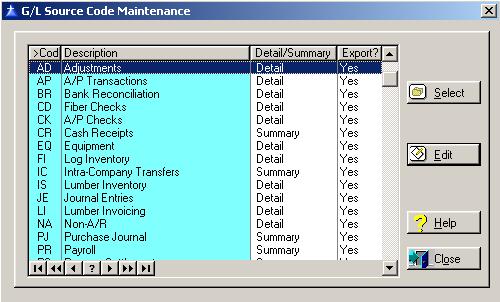
Source Codes are used to group general ledger entries by where they are originated from within the system.
To access the General Ledger Source Codes List window, select the menu option entitled Source Codes on the General Ledger Control Files Menu.
The Source Codes window will be displayed as follows:
To exit the Source Codes list window, click on Close button, press “Alt O”, or press the Esc key.
To access online help, click on the Help button, press “Alt H”, or press F1.
Account Group Maintenance
To edit an existing General Ledger Account Group, highlight the Account Group and click on the Edit button, press “Alt E”, or press Enter.
When you edit a General Ledger Source Code, the system will display the General Ledger Source Code window as follows:
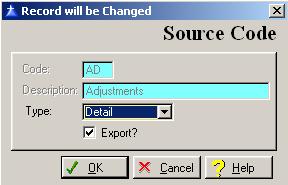
Enter or edit the information on the General Ledger Account Group window according to the following specifications:
Code
This field is controlled by the system. It is used to recognize the source.
Description
This field is controlled by the system. It is the description of the source.
Type
Select “Detail” to print the General Ledger Report for the selected source code in detail, or select “Summary” to print the General Ledger Report for the selected source code in summary only.
Export?
The “Export” field is reserved for future use.
To save and exit the Source Code window, press Page Down, click on the OK button, or press “Alt O”. To exit without saving the Source Code window, click on the Cancel button, press “Alt C”, press Esc, or click on the “X” in the upper right corner of the screen.
To access online help, click on the Help button, press “Alt H”, or press F1.
Return to Top Accounting Periods
System Controls Account Groups