The general ledger account Summary Codes are used to group multiple general ledger accounts for reporting purposes on the Income Statement and the Balance Sheet. For example, if your company has several notes payable accounts, you could group them on the balance sheet. The system allows you to either print these reports with or without the Summary Codes.
To access the Summary Code List window, select the menu option entitled Summary Codes on the General Ledger Control Files Menu.
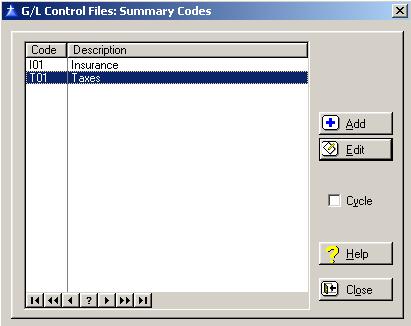
The Summary Codes List window will be displayed as follows:
Cycle Box
To remain in the add mode without returning to the Summary Codes list window each time you add a new Summary Code, check the cycle box. To place a check in the box, click on the Cycle box, press “Alt Y”, or press the Space Bar when the selection box is positioned over the “cycle” field. You would normally check the cycle box if you are entering more than one Summary Code during the current session.
To access online help, click on the Help button, press “Alt H”, or press F1.
To exit the Summary Codes list window, click on Close button, press “Alt O”, or press the Esc key.
Summary Codes Maintenance
To add a new Summary Code, click on the Add button, press “Alt A”, or press the Insert key.
To edit an existing Summary Code, highlight the Summary Code and click on the Edit button, press “Alt E”, or press Enter.
When you add a new Summary Code, the system will display the Summary Code window as follows:
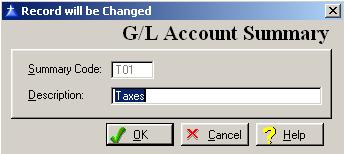
Enter or edit the information on the Summary Information window according to the following specifications:
Summary Code
The code is a three-character field used to identify the Summary Code within the system. The system does not allow the use of duplicate Summary Codes.
Summary Code Description
Enter up to thirty-characters to describe the Summary Code.
To save and exit the G/L Account Summary window, press Page Down, click on the OK button, or press “Alt O”. To exit without saving the G/L Account Summary window, click on the Cancel button, press “Alt C”, press Esc, or click on the “X” in the upper right corner of the screen.
To access online help, click on the Help button, press “Alt H”, or press F1.