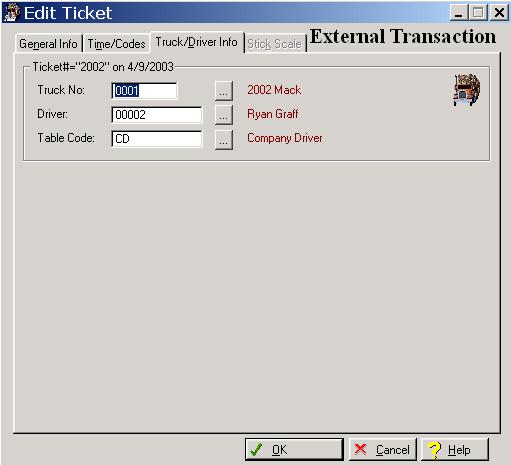
The system defaults to the General Information window whenever you select the Transaction option. To access the Truck/Driver tab, click on the Truck/Driver tab, or press “Alt D”.
The system will display the Transaction Truck/Driver window as follows:
Enter or edit information on the Scale Ticket Truck/Driver window according to the following specifications.
Truck Number
This field displays the truck hauling the load. To display a selection list of valid trucks, click on the Lookup button or, enter an invalid character and press the Enter key.
Driver Number
This field displays the driver hauling the load. To display a selection list of valid drivers, click on the Lookup button, or enter an invalid character and press the Enter key.
Rate Table
The field displays the driver’s rate table. To display a selection list of valid rate tables, click on the Lookup button, or enter an invalid character and press the Enter key.