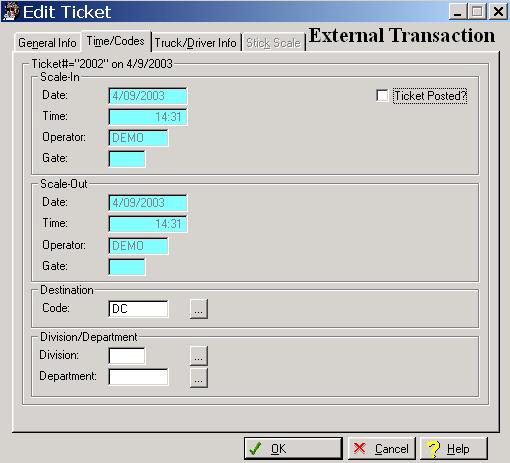
The system defaults to the General Information window whenever you select the Transaction option. To access the Times tab, click on the Times tab, or press “Alt M”.
The system will display the Transaction Times window as follows:
Enter or edit information on the External Transaction Times window according to the following specifications:
Transaction Date
This field displays the load date of the transaction.
Transaction Time
This field displays the time of the transaction.
Transaction Operator
This field displays the code of the scale operator when the truck scaled-in.
Transaction Gate
This field displays the gate number where the truck scaled-in.
Scale-Out Date
This field displays the date the truck scaled-out.
Scale-Out Time
This field displays the time the truck scaled-out and is automatically captured during the weighing process.
Scale-Out Operator
This field displays the code of the scale operator when the truck scaled-out.
Scale-Out Gate
This field displays the gate number where the load was scaled-out.
Destination Code
This field displays the destination where the load was delivered. To display a selection list of the valid destinations, click on the Lookup button, or type an invalid character and press the Enter key.
Division
If applicable, this field displays the division assigned to the transaction. If your company does not use divisions, the field is inactive. To display a selection list of the valid divisions, click on the Lookup button, or type an invalid character and press the Enter key.
Department
If applicable, this field displays the department assigned to the transaction. If your company does not use departments, the field is inactive. To display a selection list of the valid departments, click on the Lookup button, or type an invalid character, and press the Enter key.