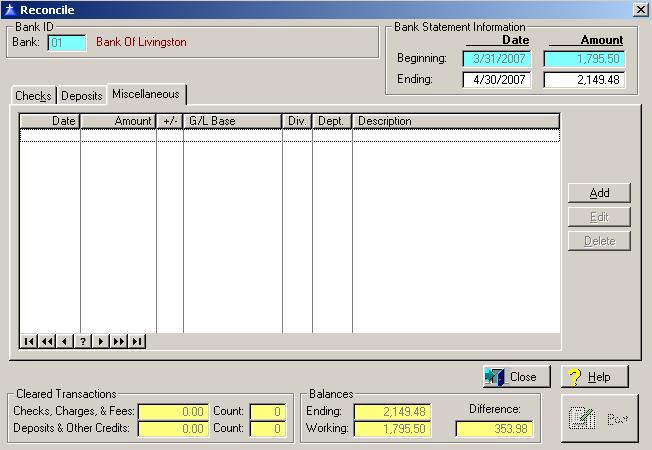
The Miscellaneous Transactions window allows you to enter bank charges, interest income, bank drafts, and any other miscellaneous bank transactions. The General Ledger system is updated each time you add a miscellaneous transaction. To access the Miscellaneous Transactions tab from another window in the Reconcile option, click on the Miscellaneous tab.
The Miscellaneous Transactions tab will be displayed as follows:
Miscellaneous Transaction Maintenance
To add a miscellaneous bank transaction, click on the Add button, press “Alt A”, or press the Insert key.
To edit an existing miscellaneous bank transaction, highlight the transaction and click on the Edit button, or press “Alt E”.
To delete an existing transaction, highlight the transaction and click on the Delete button, press “Alt D”, or press the Delete key.
To access online help, click on the Help button, press “Alt H”, or F1.
To exit the Miscellaneous window, click on Close button, or press the Esc key.
The system will display the Miscellaneous window as follows:

Enter or edit the information on the Miscellaneous window according to the following specifications:
Date
Enter the date of the miscellaneous bank transaction.
Accounting Period
The system selects the accounting period based on the date of the miscellaneous transaction compared to the accounting periods defined within the system. To display a selection list of the open accounting periods, click on the Lookup button.
G/L Base Account Number
Enter General Ledger Base Account Number for the transaction. To display a selection list of the valid general ledger account numbers defined within the system, press Enter, or click on the Lookup button.
Division Number
If your company does not use divisions, you are not allowed access to the division field. If your company uses divisions, enter the division number to which you want to distribute the transaction. If the base account number is a cost of sales, or expense account, the system will require an entry for the division field. If the base account is a balance sheet, or equity account, the system will not allow an entry in the division field unless you require divisions on balance sheet accounts. To display a selection list of the valid divisions defined within the system, press Enter, or click on the Lookup button.
Department Number
If your company does not use departments, you are not allowed access to the department field. If your company uses departments, enter the department number to which you want to distribute the Transaction. If the base account number is a cost of sales or expense account, the system will require an entry for the department field. If the base account is a balance sheet or equity account, the system will not allow an entry in the department field. To display a selection list of the valid departments defined within the system, press Enter, or click on the Lookup button.
Amount
Enter the amount of the miscellaneous transaction. The system will default to whether the transaction increases or decreases the bank account based the on the type of the general base account number. For example, if the general ledger base account is an expense, the system will automatically mark the “Decreases bank balance” field. To mark the “Increases bank balance”, or the “Decrease bank balance” field, click on the Field, or press the Space Bar when the selection box is positioned over the field.
Description
Enter the description for the transaction. An entry in this field is required and allows for up to thirty characters.
To save and exit the Miscellaneous window, press Page Down, click on the OK button, or press “Alt O”. To exit without saving the Miscellaneous window, click on the Cancel button, press “Alt C”, press Esc, or click on the “X” in the upper right corner of the screen.
To access online help, click on the Help button, press “Alt H”, or press F1.