Reconciling a bank statement involves the following steps:
1. Select the bank account
2. Enter the bank statement date and the ending balance
3. Mark cleared checks
4. Mark cleared deposits
5. Enter miscellaneous transactions
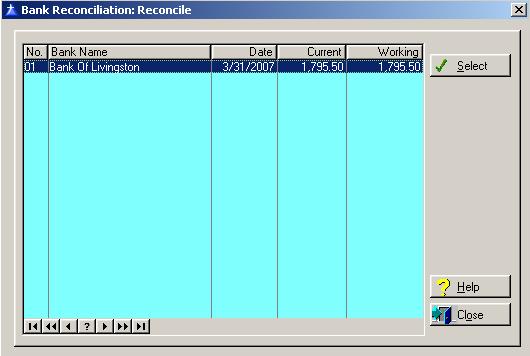
To access the Reconcile window, select the menu option entitled Reconcile on the Bank Reconciliation Processing menu.
Select the bank account that you will be reconciling. To select the bank account, highlight the bank and click the Select button, or press “Alt S”.
To access online help, click on the Help button, press “Alt H”, or press F1.
To exit the Reconcile list window, click on Close button, press “Alt O”, or press the Esc key.
After the initial reconcilement of a bank account, the system will always display the New Reconciliation window. The following window confirms that the previous reconcilement has been posted:
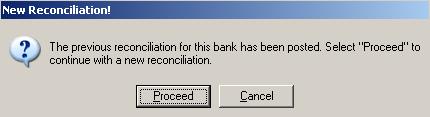
Click on the Proceed button, or press “Alt O” to continue. Click on the Cancel button, or press “Alt C” to cancel.
The Bank Reconciliation window will be displayed as follows:
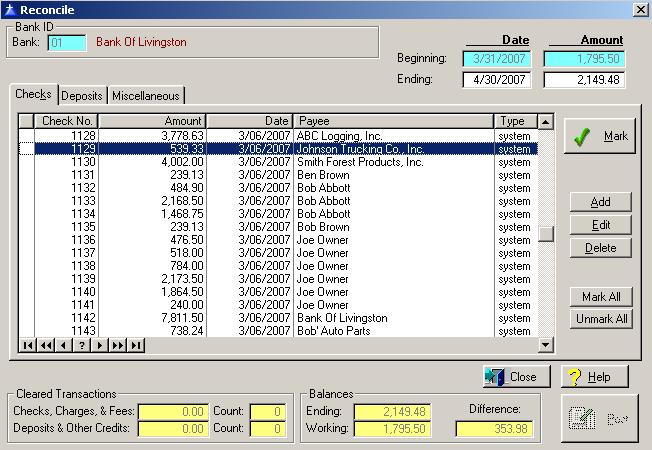
Enter or edit the information on the Reconcile window according to the following specifications:
Bank ID
This field displays the bank account selected for reconciliation from the previous browse window. This field is controlled by the system.
Beginning Bank Statement Date
If this is the initial reconciliation, you must enter the beginning bank statement date. The system will automatically maintain this field after the initial entry.
Beginning Bank Statement Balance
If this is the initial reconciliation, you must enter the beginning bank statement balance. The system will automatically maintain this field after the initial entry.
Ending Bank Statement Date
Enter the ending date of the bank statement.
Ending Bank Statement Balance
Enter the ending balance as shown on the bank statement.
Cleared Transactions
On the bottom left portion of the window, the system maintains the number of transactions and the total amount of transactions that have cleared the bank. The total checks, charges, and fees should equal the total debits and charges on the bank statement. The total deposits and other credits should equal the total credits on the bank statement.
Ending Balance
The system displays the ending bank statement balance.
Working Balance
The working balance is the difference in the beginning statement balance and the ending statement balance.
Difference
The difference field contains the difference in the ending statement balance and the working balance. When the difference is equal to zero, the bank account has been successfully reconciled.
Post Button
When you have completed reconciling the bank account, click on the Post button, or press “Alt P” to post the miscellaneous transaction the general ledger and mark the transactions as posted. The post option must be executed for the current reconcilement before you can proceed to the next reconcilement. The Post button does not activate until the “Difference” field is equal to zero.