Use this option to post external transactions to the Fiber Procurement module. To access the Post Transactions window, select the menu option entitled Post Transactions on the External Interface Processing Menu.
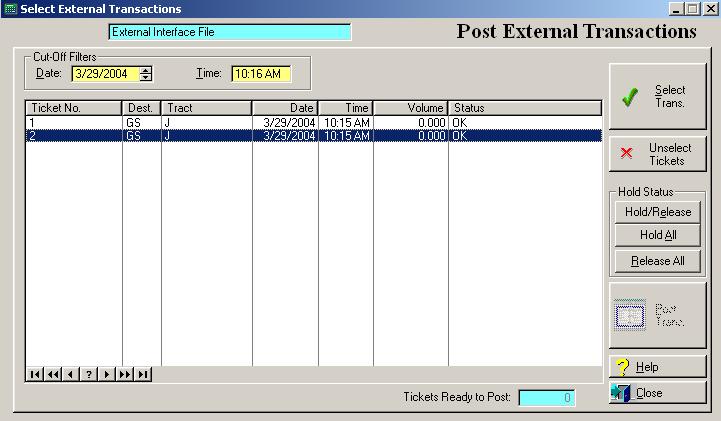
The system will display the Post Transaction window as follows:
Enter/edit information, or select options according the following specifications.
Cut-off Load Date
Enter the cut-off load date for the selected transactions to be posted. The date defaults to the current system date. Only transactions with transaction dates prior to or equal to the selected date will be displayed.
Cut-off Time
Enter the cut-off time for the selected transactions to be posted. The time defaults to the current system time. Only transactions with a time prior to or equal to the selected time will be displayed.
Select Transactions for Posting
The select transactions for posting button marks the transactions for posting based on the cut-off date and time. Transactions placed on hold cannot be selected for posting. To select transactions for posting, click on the Select Trans button, or press “Alt S”. If transactions have been selected for posting, the status field will display “Selected for Posting”.
Unselect Tickets
This process unselects all transactions for posting. To unselect transactions for posting, click on the Unselect Tickets button.
Hold/Release
To place an individual transaction on “hold”, move the highlight bar to the transaction and click on the Hold/Release button, or type “Alt E”. To release an individual transaction off of “hold”, click on the Hold/Release button, or press “Alt E”. If a transaction is on hold, the system does not allow you to select it for posting.
Hold All
To place all transactions on “hold”, click on the Hold All button, or type “Alt A”. The system does not allow you to select transactions for posting that are on hold.
Release All
To release all transactions, click on the Release All button, or type “Alt R”. The system does not allow you to select transactions for posting that are on hold.
Post Transactions
To post transactions, click on the Post Trans button, or press “Alt P”. All transactions selected for posting will be posted when the option is executed. Posted transactions are no longer displayed on the Post Transactions window.
To exit the Post External Transactions list window, click on Close button, press “Alt C”, or press the Esc key.