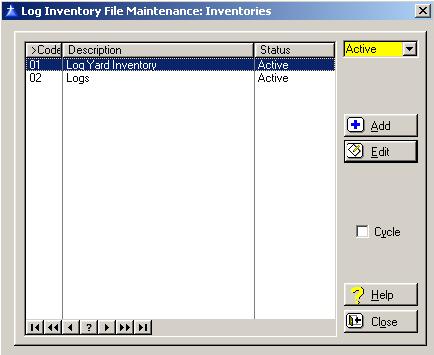
To access the Inventory List window, select the menu option entitled Inventories on the Log Inventory File Maintenance Menu.
The Inventory List window will be displayed as follows:
The system defaults to displaying only the active Inventories. To display the inactive, or both the active and inactive, click on the drop-down list box arrow located at the upper right corner of the window.
Cycle Box
To remain in the add mode without returning to the Inventories list window each time you add a new Inventory, check the cycle box. To place a check in the box, click on the Cycle box, press “Alt Y”, or press the Space Bar when the selection box is positioned over the "cycle" field. You would normally check the cycle box if you are entering more than one Inventory during the current session.
To access online help, click on the Help button, press “Alt H”, or press F1.
To exit the Inventories list window, click on Close button, press “Alt O”, or press the Esc key.
Inventory Maintenance
To add a new inventory, click on the Add button, press “Alt A”, or press the Insert key.
To edit a inventory, highlight the inventory and click on the Edit button, or press “Alt E”.