A Customer is defined as anyone you sell forest products.
The external interface conversion tables are located in the Customers file. The conversion tables are used to link key files in Forest Products Accounting with those of the customer providing the external file. You must setup conversion tables for the following interface files:
Tracts
Destinations/Culls
Producers
Products
State/Counties
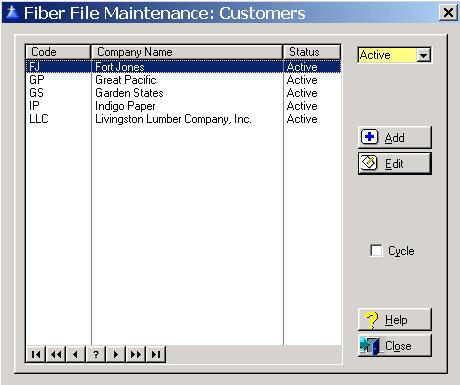
To access the Customers window, select the menu option entitled Customers on the External Interface File Maintenance Menu. The system defaults to displaying only the active Customers. To display the inactive, or both the active and inactive Customers, click on the drop-down box arrow located at the upper right corner of the window.
The system will display the Customers window as follows:
The system defaults to displaying only the active Customers. To display the inactive, or both the active and inactive Customers, click on the drop-down box arrow located at the upper right corner of the window.
Cycle Box
To remain in the add mode without returning to the Customer list window each time you add a new Customer, check the cycle box. To place a check in the box, click on the Cycle box, press “Alt Y”, or press the Space Bar when the selection box is positioned over the “cycle” field. You would normally check the cycle box if you are entering more than one Customer during the current session.
To exit the Customers list window, click on the Close button, press “Alt O”, or press the Esc key.
Customer Maintenance
To add a new Customer, click on the Add button, press “Alt A”, or press the Insert key.
To edit an existing Customer, highlight the Customer and click on the Edit button, press “Alt E”, or press Enter.
Customer Tabs