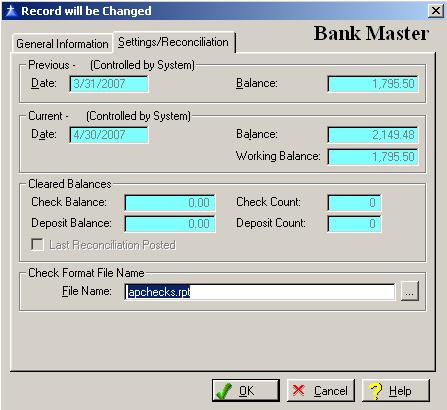
The settings/Reconciliation window primarily displays information from the Bank Reconciliation module and is maintained by the system. To access the Settings/Reconciliation tab from another window in the Bank Master option, click on the Settings/Reconciliation tab, or press “Alt S”.
The system will display the Settings/Reconciliation as follows:
Enter or edit the information on the Bank Master Setting/Reconciliation window according to the following specifications:
Previous Date
This is the ending date of the last reconciliation. This field is controlled by the system.
Previous Balance
This is the ending balance of the last reconciliation. This field is controlled by the system.
Current Date
This is the ending date of the current reconciliation. This field is controlled by the system.
Current Balance
This is the ending balance of the current reconciliation. This field is controlled by the system.
Current Working Balance
This is the current working balance. This field is controlled by the system.
Check Balance
This is the balance of current cleared checks. This field is controlled by the system.
Check Count
This is the number of currently cleared checks. This field is controlled by the system.
Deposit Balance
This is the balance of current cleared deposits. This field is controlled by the system.
Deposit Count
This is the number of currently cleared deposits. This field is controlled by the system.
Last Reconciliation Posted
The last reconciliation has been posted if there is a check in this field. If there is not a check in this field, the last reconciliation has not been posted. This field is controlled by the system.
Check Format File
Select the check format file created by Automated Accounting Systems for your company. To display a selection list of the valid check format files, press Enter, or click on the Lookup button. An entry in this field is required.
To save and exit the Bank Master window, press Page Down, click on the OK button, or press “Alt O”. To exit without saving the Bank Reconciliation window, click on the Cancel button, press “Alt C”, press Esc, or click on the “X” in the upper right corner of the screen.
To access online help, click on the Help button, press “Alt H”, or F1.