The Purge Deposits option should only be used to remove unnecessary Deposits when you have being using the system without performing bank reconciliation. This option provides you with an easy way to remove a large number of Deposits without having to manually clear each check. You do not have to use this option in the normal operation of the bank reconciliation module.
To access the Purge Deposits window, select the menu option entitled Purge Deposits on the Bank Reconciliation Utilities Menu.
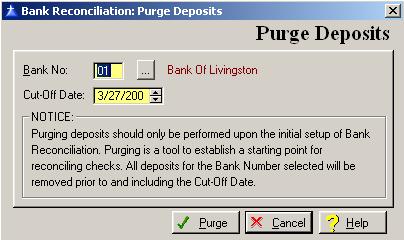
The Purge Deposits window will be displayed as follows:
Enter or edit the information on the Purge Deposits window according the following specifications:
Bank Number
Enter the bank number that contains the Deposits to be purged. To display a selection of the valid banks, press Enter, or click on the Lookup button. An entry in this field is required.
Cut-Off Date
Enter the cut-off date to be used in purging the Deposits. All Deposits for the bank number selected will be removed prior to and including the cut-off date entered.
To save and exit the Purge Deposits window, press Page Down, click on the Purge button, or press “Alt P”. To exit without saving the Purge Deposits window, click on the Cancel button, press “Alt C”, press Esc, or click on the “X” in the upper right corner of the screen.
To access online help, click on the Help button, press “Alt H”, or F1.